
Apache PDFBox - Split Pages
Operation Name
Apache PDFBox - Split PagessplitPages
Description
Splits a PDF document into multiple smaller PDFs. You can:
- Split into individual pages, or
- Split in larger chunks using the
pageIncrementparameter.
Inputs
| Parameter | Type | Required | Description |
|---|---|---|---|
PDF File [Binary] | InputStream (Binary) | Required | The PDF document to be split. |
Page Increment | Integer | Optional | How many pages per chunk. Default is 1 (split into single-page PDFs). Set to e.g. 3 to split every 3 pages into one part. |
Output
- Payload:
List<InputStream>(List of binary streams) A list of split PDFs (each withpageIncrementnumber of pages, except the last chunk which may have fewer). - Attributes:
PdfBoxFileAttributesMetadata from the original file: number of pages, size, title, etc.
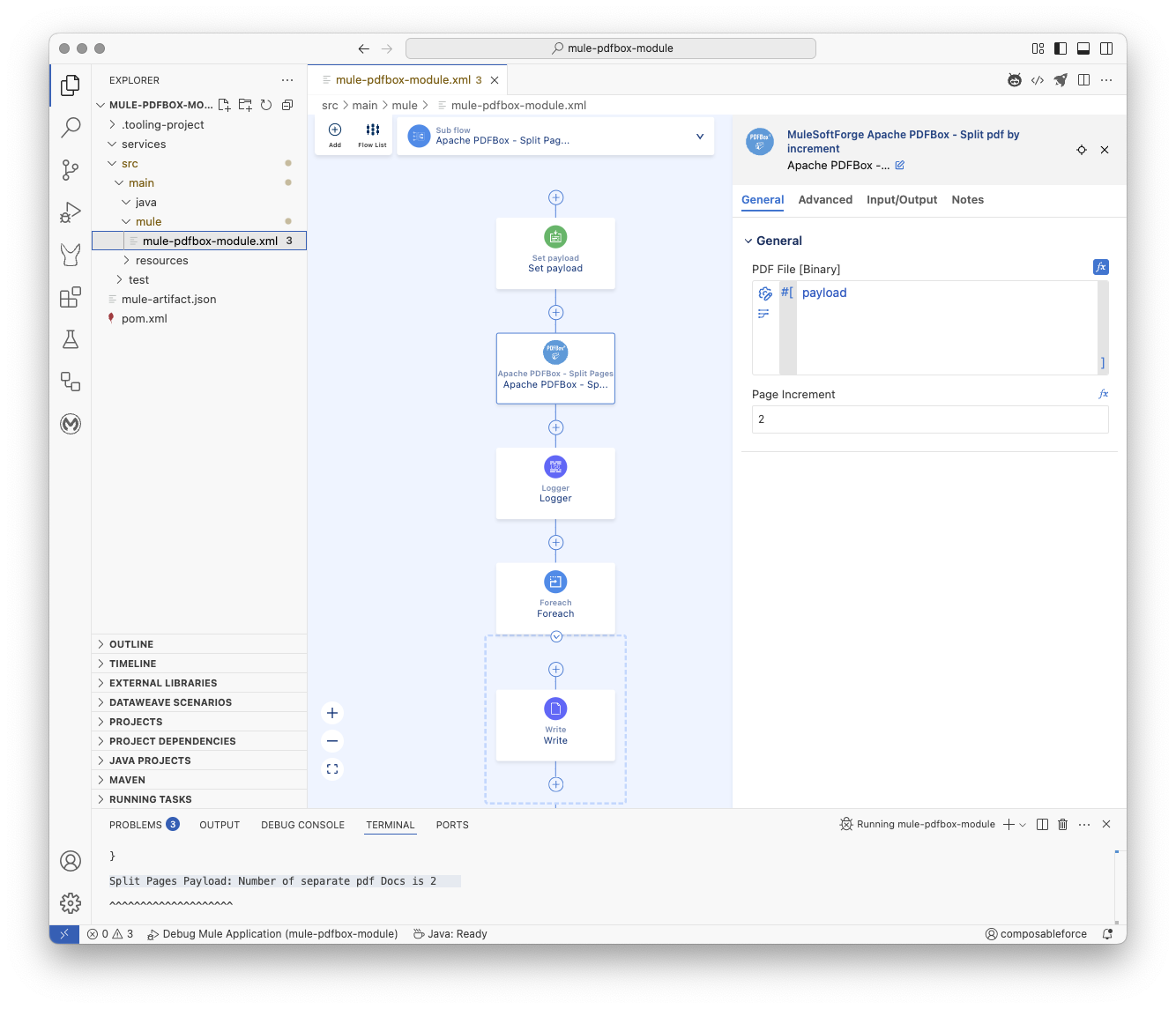
MuleSoft Flow Example
xml
<mule	xmlns="http://www.mulesoft.org/schema/mule/core"
	xmlns:doc="http://www.mulesoft.org/schema/mule/documentation"
	xmlns:pdfbox="http://www.mulesoft.org/schema/mule/pdfbox"
	xmlns:xsi="http://www.w3.org/2001/XMLSchema-instance"
	xmlns:file="http://www.mulesoft.org/schema/mule/file"
	xsi:schemaLocation="http://www.mulesoft.org/schema/mule/core
	http://www.mulesoft.org/schema/mule/core/current/mule.xsd
	http://www.mulesoft.org/schema/mule/pdfbox
	http://www.mulesoft.org/schema/mule/pdfbox/current/mule-pdfbox.xsd
	http://www.mulesoft.org/schema/mule/file
	http://www.mulesoft.org/schema/mule/file/current/mule-file.xsd">

	<flow name="main">
		<scheduler doc:name="Scheduler" doc:id="dsgkfy" >
			<scheduling-strategy>
				<fixed-frequency timeUnit="HOURS"/>
			</scheduling-strategy>
		</scheduler>
		<flow-ref name="Apache PDFBox - Split Pages" />
	</flow>

	<sub-flow name="Apache PDFBox - Split Pages">
		<set-payload doc:id="vxsfk5" doc:name="Set payload" mimeType="application/octet-stream" value='#[%dw 2.0
output application/java
---readUrl("https://www.adobe.com/support/products/enterprise/knowledgecenter/media/c4611_sample_explain.pdf", "application/octet-stream") as Binary]'></set-payload>
		<pdfbox:split-pdf-by-increment doc:name="Apache PDFBox - Split Pages" doc:id="tcisia" pageIncrement="2"/>
		<logger doc:name="Logger" doc:id="ecdqs5s" message='#[%dw 2.0
output text
---
"\n\n Apache PDFBox - Split Pages"
++ "\n\n⌄⌄⌄⌄⌄⌄⌄⌄⌄⌄⌄⌄⌄⌄⌄⌄⌄⌄⌄⌄"
++ "\n\nSplit Pages Attributes: " ++ (write(attributes, "application/json")) as String
++ "\n\nSplit Pages Payload: " ++ "Number of separate pdf Docs is " ++ (sizeOf(payload) as String)
++ "\n\n^^^^^^^^^^^^^^^^^^^^"
++ "\n\n Apache PDFBox - Split Pages"
++ "\n\n"]'/>
		<foreach doc:name="Foreach" doc:id="pjrtvx" batchSize="1">
			<file:write path='#["test" ++ (vars.counter as String) ++  ".pdf"]' doc:name="Write" doc:id="qjtqjy" />
		</foreach>
	</sub-flow>

</mule>
Notes
- Default behavior (
pageIncrement=1): Each output PDF will contain one page. - Custom chunks (
pageIncrement=3): Each output PDF will contain up to 3 pages. - Last chunk: May contain fewer pages if the total doesn't divide evenly.
- Use case: Ideal for batch processing individual pages or creating multi-page segments.
Underlying Application Interface
Pseudo Code
Operation: splitPdfByIncrement

Input:
  pdfFile: Binary content of the PDF (InputStream)
  pageIncrement: Number of pages per split document (Integer, Optional, defaults to 1)
  streamingHelper: MuleSoft StreamingHelper (for context/utilities)

Output:
  Result containing:
    - A List of InputStreams, each representing a split PDF document, as output.
    - PDF file attributes of the original document as attributes.

Errors:
  PDF_PROCESSING_ERROR: If the page increment is invalid or if saving a split document fails.
  PDF_LOAD_FAILED: If the original PDF document cannot be loaded (corrupt or invalid).
  PDF_METADATA_EXTRACTION_FAILED: If metadata cannot be retrieved from the original document.

Steps:
1. Validate the `pageIncrement`:
   - If `pageIncrement` is null or less than or equal to 0, throw a ModuleException with PDF_PROCESSING_ERROR.
2. Convert the input `pdfFile` InputStream to a byte array.
3. Get the size of the byte array (originalPdfSize).
4. Initialize an empty List to store the InputStreams of the split documents.
5. Initialize a variable for original PDF attributes (will be extracted later).
6. Try to load the original PDF document from the byte array using PDFBox Loader.
7. If loading fails, throw a ModuleException with PDF_LOAD_FAILED.
8. Try to extract metadata from the loaded original PDF document using the `extractPdfMetadata` helper.
   - If metadata extraction fails, throw a ModuleException with PDF_METADATA_EXTRACTION_FAILED.
9. Get the total number of pages from the original PDF document.
10. If the total number of pages is 0, log a warning and return an empty list of split documents with the extracted original attributes.
11. Create a new PDFBox Splitter instance.
12. Set the `splitAtPage` property of the Splitter to the `pageIncrement`.
13. Use the Splitter to split the original PDDocument into a List of new PDDocument objects.
14. Initialize a list to keep track of resources (split PDDocuments and ByteArrayOutputStreams) to close.
15. Iterate through each split PDDocument in the list returned by the Splitter:
    a. Add the current split PDDocument to the resources-to-close list.
    b. Create a new ByteArrayOutputStream.
    c. Add the ByteArrayOutputStream to the resources-to-close list.
    d. Try to save the current split PDDocument to the ByteArrayOutputStream.
    e. If saving fails, throw a ModuleException with PDF_PROCESSING_ERROR.
    f. Create a new ByteArrayInputStream from the ByteArrayOutputStream's content and add it to the list of split documents.
16. After processing all split documents, close all the split PDDocuments in the resources-to-close list. (Closing ByteArrayOutputStreams is generally a no-op and not strictly necessary here).
17. Log the number of split documents created and the page increment used.
18. Create a Result object containing:
    - The List of InputStreams (the split PDF contents) as the output.
    - The extracted original PDF file attributes as attributes.
19. Return the Result object.
20. Ensure the original loaded PDF document is closed properly in a finally block, even if errors occur during splitting or saving.
Methods used from the Apache PDFBox library
org.apache.pdfbox.Loader.loadPDF(byte[] input): Used in Step 6 to load the original PDF document from the input byte array.org.apache.pdfbox.pdmodel.PDDocument.getDocumentInformation(): Used within theextractPdfMetadatahelper (called in Step 8) to retrieve the metadata from the original document. Methods from the returnedPDDocumentInformationobject (likegetTitle(),getAuthor(), etc.) are then used to populate the attributes.org.apache.pdfbox.pdmodel.PDDocument.getNumberOfPages(): Used in Step 9 to get the total number of pages in the original document.org.apache.pdfbox.multipdf.Splitter(): Used in Step 11 to create a new instance of the PDF splitter.org.apache.pdfbox.multipdf.Splitter.setSplitAtPage(int pageIncrement): Used in Step 12 to configure the splitter to split the document everypageIncrementpages.org.apache.pdfbox.multipdf.Splitter.split(PDDocument document): Used in Step 13 to perform the actual splitting of the original PDDocument into a list of new PDDocument objects.org.apache.pdfbox.pdmodel.PDDocument.save(OutputStream output): Used in Step 15d within the loop to save each individual split PDDocument to aByteArrayOutputStream.org.apache.pdfbox.pdmodel.PDDocument.close(): Used in Step 16 to close each of the split PDDocuments after they have been saved, and also in Step 20 to ensure the original loaded PDDocument is closed.