
Apache PDFBox - Merge PDFs
Operation Name
Apache PDFBox - Merge PDFsmergePdfs
Description
Combines two or more PDF documents into a single unified PDF. Each input file is processed in-memory using PDFBox's random-access buffering to ensure full compatibility with PDFBox 3.0.x.
Ideal for combining related documents before delivery, archiving, or downstream transformation.
Inputs
- PDF Files [List of Binary] (
List<InputStream>) A list of PDF streams to merge. Must contain at least two. Provided via a DataWeave expression or flow variable (e.g.,#[payload],#[vars.myList]).
Output
- Payload:
InputStream(binary stream) A single merged PDF containing all input documents, in the order provided. - Attributes:
PdfBoxFileAttributesMetadata from the merged output which will be from the FIRST pdf except total page count will be the combined page total of merged pdf: total page count, file size, title, author, etc.
MuleSoft Flow Example
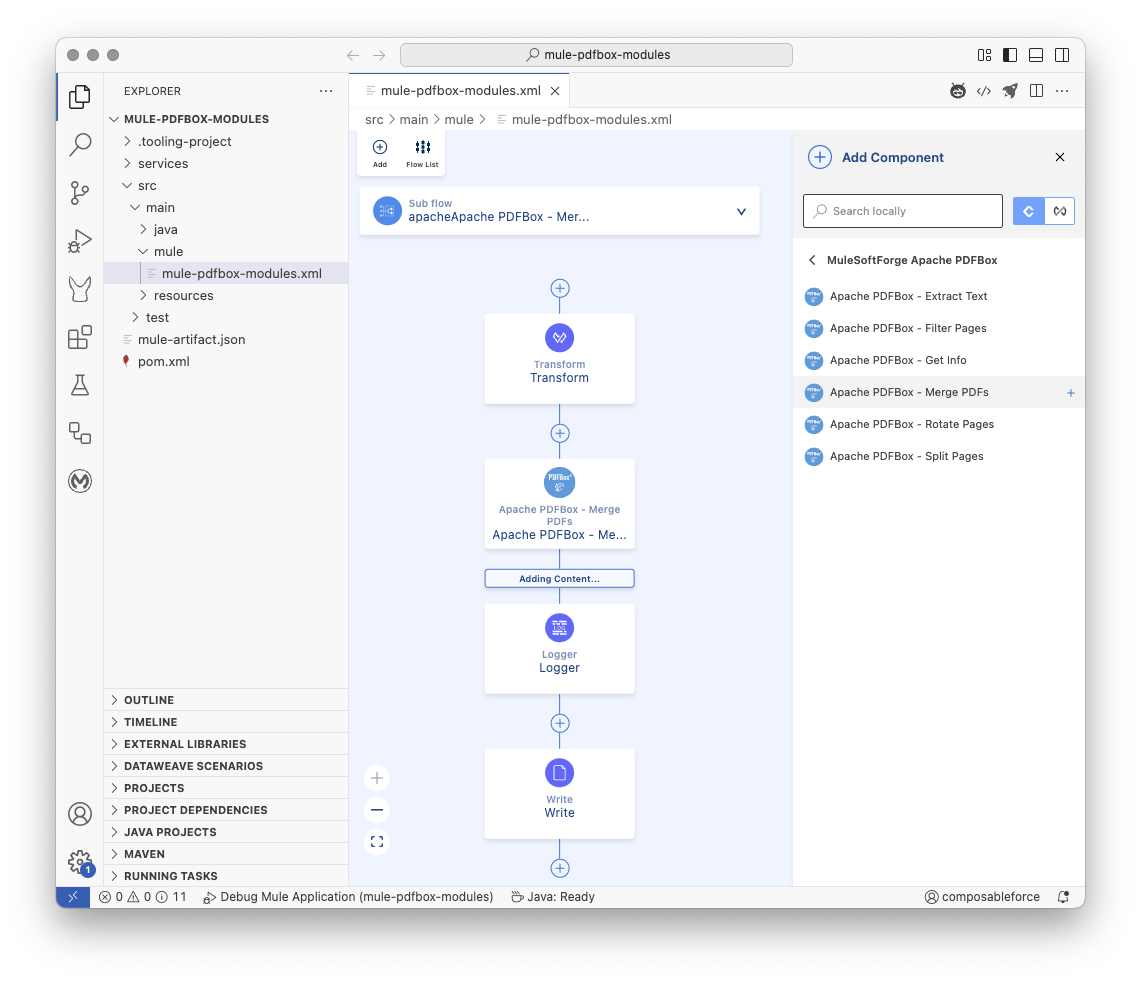
xml
<mule xmlns="http://www.mulesoft.org/schema/mule/core" xmlns:doc="http://www.mulesoft.org/schema/mule/documentation" xmlns:xsi="http://www.w3.org/2001/XMLSchema-instance"
	xmlns:ee="http://www.mulesoft.org/schema/mule/ee/core"
	xmlns:pdfbox="http://www.mulesoft.org/schema/mule/pdfbox"
	xmlns:file="http://www.mulesoft.org/schema/mule/file" xsi:schemaLocation="http://www.mulesoft.org/schema/mule/core http://www.mulesoft.org/schema/mule/core/current/mule.xsd
	http://www.mulesoft.org/schema/mule/ee/core http://www.mulesoft.org/schema/mule/ee/core/current/mule-ee.xsd
	http://www.mulesoft.org/schema/mule/pdfbox http://www.mulesoft.org/schema/mule/pdfbox/current/mule-pdfbox.xsd
	http://www.mulesoft.org/schema/mule/file http://www.mulesoft.org/schema/mule/file/current/mule-file.xsd">

  <flow name="main">
    <scheduler doc:name="Scheduler" doc:id="cjvhev" >
      <scheduling-strategy>
        <fixed-frequency timeUnit="HOURS"/>
      </scheduling-strategy>
    </scheduler>
    <flow-ref  name="Apache PDFBox - Merge PDFs"/>
  </flow>

  <sub-flow name="Apache PDFBox - Merge PDFs">
    <ee:transform doc:name="Transform" doc:id="llryqt" >
      <ee:message >
        <ee:set-payload ><![CDATA[%dw 2.0
output application/java
---
[
  readUrl("https://www.adobe.com/support/products/enterprise/knowledgecenter/media/c4611_sample_explain.pdf", "application/octet-stream") as Binary,
	readUrl("https://pdfobject.com/pdf/pdf_open_parameters_acro8.pdf", "application/octet-stream") as Binary
]]]></ee:set-payload>
      </ee:message>
    </ee:transform>
    <pdfbox:merge-pdfs doc:name="Apache PDFBox - Merge PDFs" doc:id="otleor" />
    <logger doc:name="Logger" doc:id="dulyhd" message='#[%dw 2.0
output text
---
"\n\n Apache PDFBox - Merge PDFs"
++ "\n\n⌄⌄⌄⌄⌄⌄⌄⌄⌄⌄⌄⌄⌄⌄⌄⌄⌄⌄⌄⌄"
++ "\n\nMerge PDFs Attributes: " ++ (write(attributes, "application/json")) as String
++ "\n\n^^^^^^^^^^^^^^^^^^^^"
++ "\n\n Apache PDFBox - Merge PDFs"
++ "\n\n"]'/>
    <file:write path="test.pdf" doc:name="Write" doc:id="wkvixs" />
  </sub-flow>

</mule>
Notes
- Order matters: PDFs will be merged in the order they appear in the input list.
- Minimum 2 PDFs: The operation requires at least two PDFs to merge.
- Metadata: The merged PDF inherits metadata from the first PDF in the list, except the page count reflects the total.
- Random-access buffering: Ensures compatibility with PDFBox 3.0.x in-memory processing.
Underlying Application Interface
Pseudo Code
 Operation: mergePdfs

Input:
  pdfFiles: A List of InputStreams, where each InputStream is the binary content of a PDF file. Must contain at least two InputStreams.
  streamingHelper: MuleSoft StreamingHelper (for context/utilities - not directly used in logic shown).

Output:
  Result containing:
    - Merged PDF content (InputStream) as output.
    - PDF file attributes (PdfBoxFileAttributes) of the merged document as attributes.

Errors:
  PDF_PROCESSING_ERROR: If fewer than two PDF files are provided, or if the merge or saving fails.
  PDF_LOAD_FAILED: If the merged PDF document cannot be loaded for metadata extraction.
  PDF_METADATA_EXTRACTION_FAILED: If metadata cannot be retrieved from the merged document.
  IOException: If reading input streams or closing resources fails.

Steps:
1. Check the size of the input `pdfFiles` list.
2. If the size is less than 2, throw a ModuleException with PDF_PROCESSING_ERROR and a message indicating that at least two files are required.
3. Create a new ByteArrayOutputStream to write the merged PDF content to.
4. Create a new PDFMergerUtility instance.
5. Set the destination stream of the PDFMergerUtility to the ByteArrayOutputStream.
6. Initialize an empty List to store RandomAccessRead buffers created from the input streams.
7. Try Block:
   a. Iterate through each InputStream in the input `pdfFiles` list:
      i. Convert the current InputStream to a byte array using the `toByteArray` helper method.
      ii. Create a new RandomAccessReadBuffer from the byte array.
      iii. Add the created RandomAccessReadBuffer to the list of buffers.
      iv. Add the created RandomAccessReadBuffer as a source to the PDFMergerUtility.
   b. Call the `mergeDocuments(null)` method on the PDFMergerUtility to perform the merge operation.
   c. Get the byte array from the ByteArrayOutputStream (this is the merged PDF content).
   d. Try-with-Resources Block (for loading the merged document for metadata):
      i. Load the merged PDF byte array into a PDDocument using PDFBox Loader.
      ii. If loading fails, this block will throw an IOException, which will be caught by the outer catch block.
      iii. Extract metadata from the loaded merged PDDocument and get the size of the merged byte array using the `extractPdfMetadata` helper method.
      iv. Create a Result object containing:
          - A new InputStream created from the merged byte array as the output.
          - Set the media type to APPLICATION_OCTET_STREAM.
          - The extracted PdfBoxFileAttributes object as attributes.
      v. Return the Result object.
   e. End Try-with-Resources Block.
8. Catch Block (for IOException):
   a. If any IOException occurs during the Try Block (reading streams, merging, saving, loading merged doc), catch it.
   b. Throw a ModuleException with PDF_PROCESSING_ERROR and the original IOException as the cause.
9. Finally Block:
   a. Iterate through the list of created RandomAccessRead buffers.
   b. For each buffer, attempt to close it.
   c. If closing a buffer throws an IOException, log a warning but continue closing other buffers.
Methods used from the Apache PDFBox library
org.apache.pdfbox.multipdf.PDFMergerUtility(): The constructor is used in Step 4 to create an instance of the utility class responsible for merging.org.apache.pdfbox.multipdf.PDFMergerUtility.setDestinationStream(OutputStream outputStream): Used in Step 5 to tell the merger where to write the resulting merged PDF.org.apache.pdfbox.io.RandomAccessReadBuffer(byte[] bytes): The constructor is used in Step 7a ii to create a buffer from the byte array of each input PDF. This buffer is required by the merger utility.org.apache.pdfbox.multipdf.PDFMergerUtility.addSource(RandomAccessRead source): Used in Step 7a iv within the loop to add each input PDF (represented by aRandomAccessReadBuffer) to the list of documents to be merged.org.apache.pdfbox.multipdf.PDFMergerUtility.mergeDocuments(MemoryUsageSetting memoryUsageSetting): Used in Step 7b to perform the actual merging process. Thenullargument indicates default memory usage settings.org.apache.pdfbox.Loader.loadPDF(byte[] input): Used in Step 7d i within a try-with-resources block to load the newly created merged PDF byte array into aPDDocumentobject, specifically for the purpose of extracting its metadata.org.apache.pdfbox.pdmodel.PDDocument.getDocumentInformation(): Used within theextractPdfMetadatahelper method (called in Step 7d iii) to get the metadata dictionary of the merged document.org.apache.pdfbox.pdmodel.PDDocument.getNumberOfPages(): Used within theextractPdfMetadatahelper method (called in Step 7d iii) to get the page count of the merged document.org.apache.pdfbox.io.RandomAccessRead.close(): Used in Step 9b within the finally block to close theRandomAccessReadBufferresources that were created for each input PDF.org.apache.pdfbox.pdmodel.PDDocument.close(): Used implicitly by the try-with-resources block in Step 7d to close thePDDocumentcreated from the merged bytes after metadata extraction.