
Apache PDFBox - Get Info
Operation Name
Apache PDFBox - Get InfoextractInfo
Description
Extracts metadata and structural details from a PDF document. This includes properties like author, title, number of pages, creation/modification dates, and file size.
Inputs
| Parameter | Type | Required | Description |
|---|---|---|---|
PDF File [Binary] | InputStream (Binary) | Required | The PDF document for which to extract information. |
Output
Attributes:
PdfBoxFileAttributesA custom object containing metadata and structural details:Field Type Description numberOfPagesintTotal number of pages in the PDF pdfSizelongSize in bytes titleStringDocument title authorStringAuthor metadata subjectStringSubject metadata keywordsStringKeywords metadata creatorStringTool or system used to create the PDF producerStringPDF producer metadata creationDateStringDate created (ISO-8601) modificationDateStringDate modified (ISO-8601)
MuleSoft Flow Example
Here's how to call this operation in a MuleSoft flow:
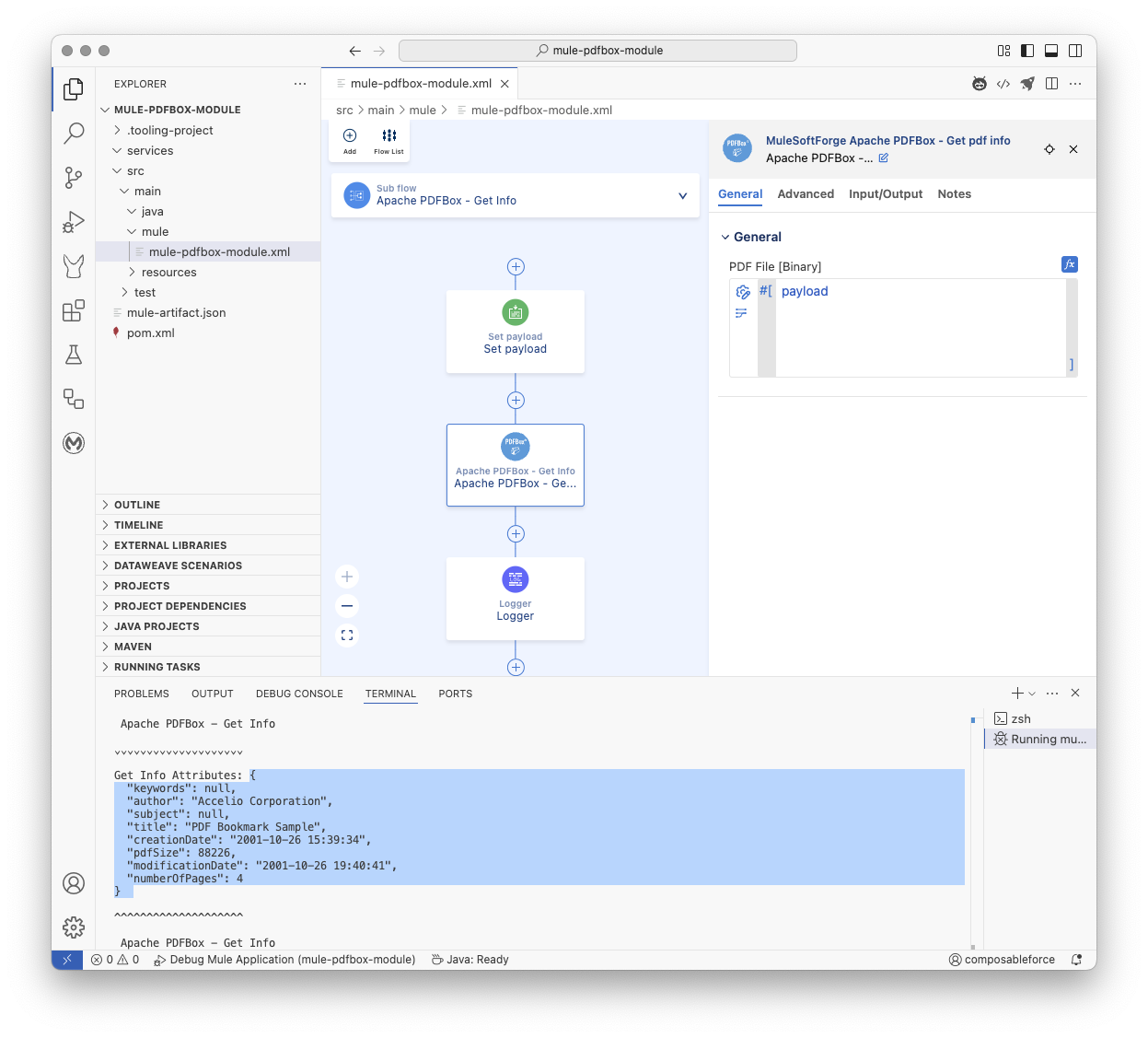
xml
<mule
	xmlns="http://www.mulesoft.org/schema/mule/core"
	xmlns:doc="http://www.mulesoft.org/schema/mule/documentation"
	xmlns:pdfbox="http://www.mulesoft.org/schema/mule/pdfbox"
	xmlns:xsi="http://www.w3.org/2001/XMLSchema-instance"
	xsi:schemaLocation="http://www.mulesoft.org/schema/mule/core
	http://www.mulesoft.org/schema/mule/core/current/mule.xsd
	http://www.mulesoft.org/schema/mule/pdfbox
	http://www.mulesoft.org/schema/mule/pdfbox/current/mule-pdfbox.xsd">

	<flow name="main">
		<scheduler doc:name="Scheduler" doc:id="dsgkfy" >
			<scheduling-strategy>
				<fixed-frequency timeUnit="HOURS"/>
			</scheduling-strategy>
		</scheduler>
		<flow-ref name="Apache PDFBox - Get Info" />
	</flow>

	<sub-flow name="Apache PDFBox - Get Info">
		<set-payload doc:id="vxsfk3" doc:name="Set payload" mimeType="application/octet-stream" value='#[%dw 2.0
output application/java
---readUrl("https://www.adobe.com/support/products/enterprise/knowledgecenter/media/c4611_sample_explain.pdf", "application/octet-stream") as Binary]'></set-payload>
		<pdfbox:get-pdf-info doc:name="Apache PDFBox - Get Info" doc:id="etasls" />
		<logger doc:name="Logger" doc:id="ecdqs3" message='#[%dw 2.0
output text
---
"\n\n Apache PDFBox - Get Info"
++ "\n\n⌄⌄⌄⌄⌄⌄⌄⌄⌄⌄⌄⌄⌄⌄⌄⌄⌄⌄⌄⌄"
++ "\n\nGet Info Attributes: " ++ (write(attributes, "application/json")) as String
++ "\n\n^^^^^^^^^^^^^^^^^^^^"
++ "\n\n Apache PDFBox - Get Info"
++ "\n\n"]'/>
	</sub-flow>

</mule>
Notes
- The operation does not modify the PDF—only reads metadata.
- Ideal for auditing, indexing, or validating PDFs before further processing.
Underlying Application Interface:
Pseudo Code
Operation: getPdfInfo

Input:
  pdfFile: Binary content of the PDF (InputStream)
  streamingHelper: MuleSoft StreamingHelper (for context/utilities)

Output:
  Result containing:
    - Original PDF content (InputStream) as output
    - PDF file attributes (PdfBoxFileAttributes) as attributes

Errors:
  PDF_LOAD_FAILED: If the PDF document cannot be loaded (corrupt or invalid).
  PDF_METADATA_EXTRACTION_FAILED: If metadata cannot be retrieved from the loaded document.

Steps:
1. Convert the input `pdfFile` InputStream to a byte array.
2. Get the size of the byte array (pdfSize).
3. Try to load the PDF document from the byte array using PDFBox Loader.
4. If loading fails, throw a ModuleException with PDF_LOAD_FAILED.
5. Try to extract metadata from the loaded PDF document:
   a. Get the PDDocumentInformation object from the loaded document.
   b. If PDDocumentInformation is null, throw a ModuleException with PDF_METADATA_EXTRACTION_FAILED.
   c. Create a new PdfBoxFileAttributes object.
   d. Set the number of pages from the loaded document.
   e. Set the pdfSize.
   f. Get and set other metadata fields (Title, Author, Subject, Keywords) from PDDocumentInformation.
   g. Get and format CreationDate and ModificationDate, then set them in attributes.
6. Log relevant information (pages, size, title, author).
7. Create a Result object containing:
   a. A new InputStream created from the original byte array (to return the original content).
   b. Set the media type to APPLICATION_OCTET_STREAM.
   c. The extracted PdfBoxFileAttributes object as attributes.
8. Return the Result object.
9. Ensure the loaded PDF document is closed properly after processing (using try-with-resources or a finally block).
Methods used from the Apache PDFBox library
org.apache.pdfbox.Loader.loadPDF(byte[] input): Used to load the PDF document.org.apache.pdfbox.pdmodel.PDDocument.getNumberOfPages(): Used to get the total number of pages.org.apache.pdfbox.pdmodel.PDDocument.getDocumentInformation(): Used to get the document's metadata.org.apache.pdfbox.pdmodel.PDDocumentInformation(methods likegetTitle(),getAuthor(),getSubject(),getKeywords(),getCreationDate(),getModificationDate()): Used to retrieve specific metadata fields.org.apache.pdfbox.pdmodel.PDDocument.close(): Used to close the loaded document.