
Apache PDFBox - Filter Pages
Operation Name
Apache PDFBox - Filter PagesfilterPages
Description
Filters pages from a PDF document based on two optional criteria:
- Remove blank pages
- Retain only selected page ranges
This is useful for preprocessing documents by cleaning up whitespace or extracting specific sections to keep processing times and associated costs to a minimum.
Inputs
| Parameter | Type | Required | Description |
|---|---|---|---|
PDF File [Binary] | InputStream (Binary) | Required | The input PDF document to be filtered. |
Remove Blank Pages | Boolean | Optional | If true, pages without visible text, images, or annotations will be removed. |
Page Range | String | Optional | Comma-separated list of page numbers or ranges to retain (e.g., 1,3,5-7). If not provided, all pages are considered. |
Output
- Payload:
InputStream(Binary) A new filtered PDF stream containing only the selected (and non-blank) pages. - Attributes:
PdfBoxFileAttributesMetadata from the original document (e.g., page count, author, title, etc.).
MuleSoft Flow Example
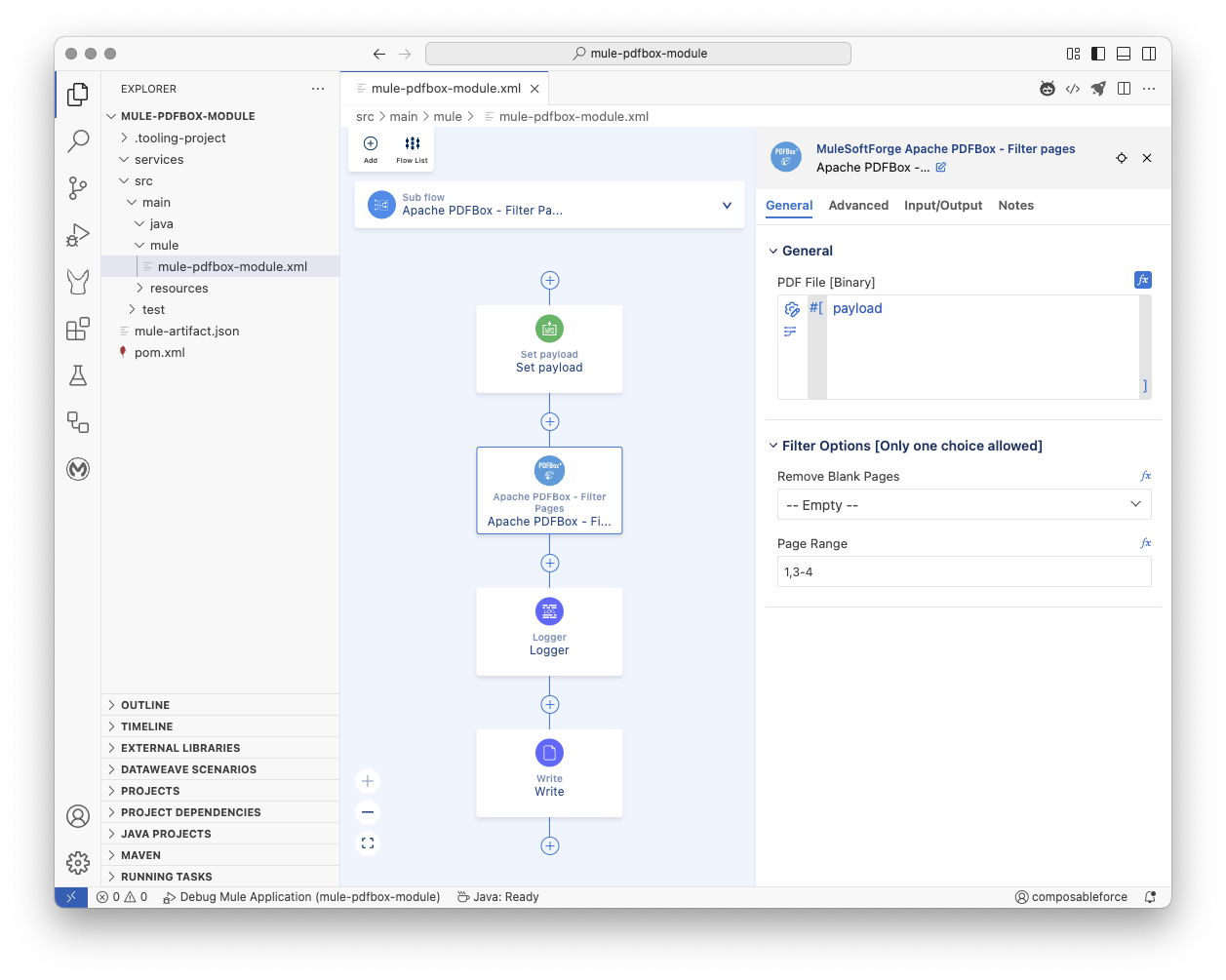
xml
<mule
	xmlns="http://www.mulesoft.org/schema/mule/core"
	xmlns:doc="http://www.mulesoft.org/schema/mule/documentation"
	xmlns:pdfbox="http://www.mulesoft.org/schema/mule/pdfbox"
	xmlns:xsi="http://www.w3.org/2001/XMLSchema-instance"
	xmlns:file="http://www.mulesoft.org/schema/mule/file"
	xsi:schemaLocation="http://www.mulesoft.org/schema/mule/core
	http://www.mulesoft.org/schema/mule/core/current/mule.xsd
	http://www.mulesoft.org/schema/mule/pdfbox
	http://www.mulesoft.org/schema/mule/pdfbox/current/mule-pdfbox.xsd
	http://www.mulesoft.org/schema/mule/file
	http://www.mulesoft.org/schema/mule/file/current/mule-file.xsd">

	<flow name="main">
		<scheduler doc:name="Scheduler" doc:id="dsgkfy" >
			<scheduling-strategy>
				<fixed-frequency timeUnit="HOURS"/>
			</scheduling-strategy>
		</scheduler>
		<flow-ref name="Apache PDFBox - Filter Pages" />
	</flow>

	<sub-flow name="Apache PDFBox - Filter Pages">
		<set-payload doc:id="vxsfk2" doc:name="Set payload" mimeType="application/octet-stream" value='#[%dw 2.0
output application/java
---readUrl("https://www.adobe.com/support/products/enterprise/knowledgecenter/media/c4611_sample_explain.pdf", "application/octet-stream") as Binary]'></set-payload>
		<pdfbox:filter-pages doc:id="vlvadh" doc:name="Apache PDFBox - Filter Pages" pageRange="1,3-4"></pdfbox:filter-pages>
		<logger doc:name="Logger" doc:id="ecdqs2s" message='#[%dw 2.0
output text
---
"\n\n Apache PDFBox - Filter Pages"
++ "\n\n⌄⌄⌄⌄⌄⌄⌄⌄⌄⌄⌄⌄⌄⌄⌄⌄⌄⌄⌄⌄"
++ "\n\nFilter Pages Attributes: " ++ (write(attributes, "application/json")) as String
++ "\n\n^^^^^^^^^^^^^^^^^^^^"
++ "\n\n Apache PDFBox - Filter Pages"
++ "\n\n"]'/>
		<file:write path="test.pdf" doc:name="Write" doc:id="edxzkf" />
	</sub-flow>

</mule>
Notes
- Page Indexing: 1-based (e.g.,
1= first page). - If both options are omitted, the PDF is returned unmodified.
- You can combine both
removeBlankPagesandpageRangefor tighter filtering.- For example: remove blank pages after retaining only pages 2–6.
- Output is a binary PDF, not text.
Underlying Application Interface
Pseudo Code
Operation: filterPages

Input:
  pdfFile: Binary content of the PDF (InputStream)
  options: Parameter Group (PdfBoxPdfOptions) containing:
    - pageRange: Comma-separated string of pages or ranges to keep (Optional)
    - removeBlankPages: Option to remove blank pages (e.g., "Yes" or "No")
  streamingHelper: MuleSoft StreamingHelper (for context/utilities)

Output:
  Result containing:
    - Filtered PDF content (InputStream) as output
    - PDF file attributes of the filtered document as attributes

Errors:
  PDF_LOAD_FAILED: If the original PDF document cannot be loaded (corrupt or invalid).
  PDF_PROCESSING_ERROR: If there's an error during filtering (e.g., saving the filtered document).
  PDF_INVALID_PAGE_RANGE: If the provided pageRange format is invalid.
  PDF_METADATA_EXTRACTION_FAILED: If metadata cannot be extracted (though this is less likely for the filtered doc).

Steps:
1. Convert the input `pdfFile` InputStream to a byte array.
2. Try to load the original PDF document from the byte array using PDFBox Loader.
3. If loading fails, throw a ModuleException with PDF_LOAD_FAILED.
4. Create a *new*, empty PDDocument to hold the filtered pages.
5. Get the total number of pages from the original PDF document.
6. Parse the `options.pageRange` string into a Set of unique page numbers that *should be kept*.
   - If `options.pageRange` is null or empty, the set should include all pages.
   - Validate the format and bounds of the page range using the `parsePageRange` helper logic.
   - If parsing or validation fails, throw a ModuleException with PDF_INVALID_PAGE_RANGE.
7. Check the `options.removeBlankPages` value to determine if blank pages should be removed.
8. Iterate through each page of the *original* PDF document (from page 0 to totalPages - 1).
9. For the current page (let's say at index `i`, corresponding to page number `i + 1`):
   a. Check if the page number (`i + 1`) is present in the Set of pages to keep.
      - If *not* in the set, skip this page and continue to the next iteration.
   b. If the page number *is* in the set, check if blank page removal is enabled *and* if the current page is blank using the `isPageBlank` helper logic.
      - If blank page removal is enabled *and* the page is determined to be blank, skip this page and continue to the next iteration.
   c. If the page passes both checks (it's in the "keep" set and either blank removal is off or the page is not blank), add the current page from the *original* document to the *new* filtered document.
10. After iterating through all pages, save the *new* filtered PDDocument to a ByteArrayOutputStream.
11. If saving fails, throw a ModuleException with PDF_PROCESSING_ERROR.
12. Extract metadata from the *filtered* PDDocument and get the size of the ByteArrayOutputStream.
13. Create a Result object containing:
    - An InputStream created from the ByteArrayOutputStream (the filtered PDF content) as the output.
    - Set the media type to APPLICATION_OCTET_STREAM.
    - The extracted PDF file attributes of the filtered document.
14. Return the Result object.
15. Ensure both the original and the new filtered PDF documents are closed properly after processing (using try-with-resources or finally blocks).
Methods used from the Apache PDFBox library
org.apache.pdfbox.Loader.loadPDF(byte[] input): Used to load the original PDF document from a byte array.org.apache.pdfbox.pdmodel.PDDocument(): Constructor used to create a new, empty PDDocument for the filtered pages.org.apache.pdfbox.pdmodel.PDDocument.getNumberOfPages(): Used to get the total number of pages from the original PDF document.org.apache.pdfbox.pdmodel.PDDocument.getPage(int pageIndex): Used to retrieve a specific page from the original document by its zero-based index.org.apache.pdfbox.pdmodel.PDDocument.addPage(PDPage page): Used to add a page from the original document to the new, filtered document.org.apache.pdfbox.pdmodel.PDDocument.save(OutputStream output): Used to save the new, filtered PDDocument to an output stream (in this case, aByteArrayOutputStream).org.apache.pdfbox.pdmodel.PDDocument.close(): Used to close both the original and the new filtered PDDocuments to release resources.org.apache.pdfbox.pdmodel.PDDocument.getDocumentInformation(): Used within theextractPdfMetadatahelper method (which is called byfilterPages) to get the document's metadata.org.apache.pdfbox.pdmodel.PDPage.getResources(): Used within theisPageBlankhelper method to check for resources like images.org.apache.pdfbox.pdmodel.PDDocument.getDocumentCatalog(): Used within theisPageBlankhelper method to access the document catalog.org.apache.pdfbox.pdmodel.PDDocumentCatalog.getAcroForm(): Used within theisPageBlankhelper method to access interactive form fields.org.apache.pdfbox.pdmodel.interactive.form.PDAcroForm.getFields(): Used within theisPageBlankhelper method to get the list of form fields.org.apache.pdfbox.pdmodel.interactive.form.PDField.getWidgets(): Used within theisPageBlankhelper method to get the widgets associated with a form field.org.apache.pdfbox.pdmodel.interactive.annotation.PDAnnotationWidget.getPage(): Used within theisPageBlankhelper method to check which page a widget is on.org.apache.pdfbox.pdmodel.PDPage.getAnnotations(): Used within theisPageBlankhelper method to check for annotations on the page.org.apache.pdfbox.text.PDFTextStripper.getText(PDDocument doc): Used within theisPageBlankhelper method to extract text from a single page to check if it's blank.org.apache.pdfbox.text.PDFTextStripper.setStartPage(int startPage): Used within theisPageBlankhelper method.org.apache.pdfbox.text.PDFTextStripper.setEndPage(int endPage): Used within theisPageBlankhelper method.