
Apache PDFBox - Extract Text
Operation Name
Apache PDFBox - Extract TextextractTextWithPageRange
Description
Extracts text content from one or more selected pages in a PDF. You can optionally define specific pages or ranges using a string like "1,3,5-7".
Utilize Apache PDFBox® to extract the text of PDF document to:
- Classify a pdf before choosing which MuleSoft IDP Document Action to use
- Feed an LLM prompt
Inputs
| Parameter | Type | Required | Description |
|---|---|---|---|
PDF File [Binary] | InputStream (Binary) | Required | The PDF file whose text content you want to extract. |
Page Range | String | Optional | Comma-separated list of individual pages and ranges (e.g., 2,4,9-12). If omitted, all pages are used. |
Output
- Payload:
StringContains the extracted text from the specified pages. - Attributes:
PdfBoxFileAttributesIncludes metadata such as:numberOfPagespdfSizetitle,author,subject,keywordscreationDate,modificationDate
MuleSoft Flow Example
Here's how to call this operation in a MuleSoft flow:
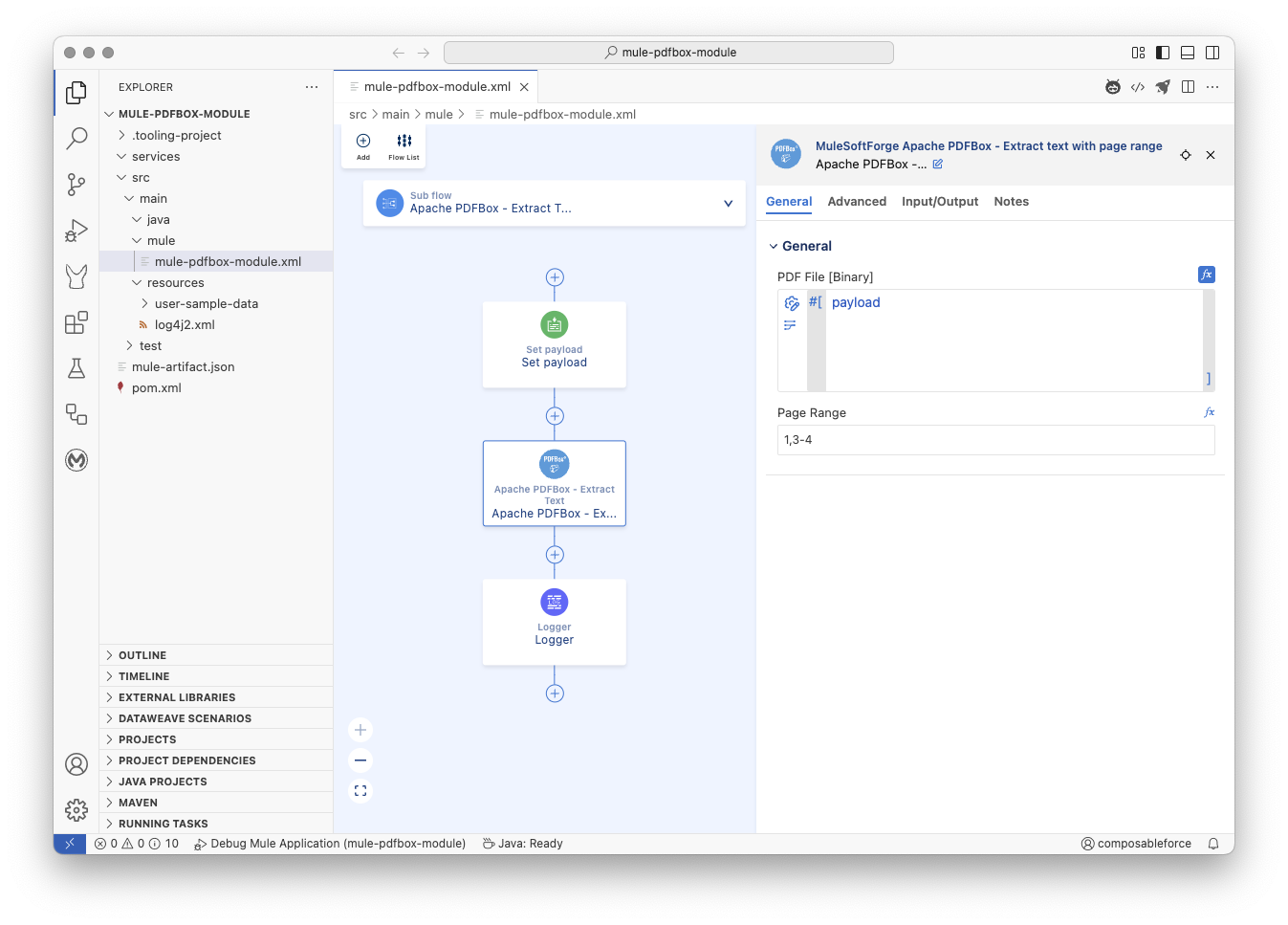
xml
<mule
	xmlns="http://www.mulesoft.org/schema/mule/core"
	xmlns:doc="http://www.mulesoft.org/schema/mule/documentation"
	xmlns:pdfbox="http://www.mulesoft.org/schema/mule/pdfbox"
	xmlns:xsi="http://www.w3.org/2001/XMLSchema-instance"

	xsi:schemaLocation="http://www.mulesoft.org/schema/mule/core
	http://www.mulesoft.org/schema/mule/core/current/mule.xsd
	http://www.mulesoft.org/schema/mule/pdfbox
	http://www.mulesoft.org/schema/mule/pdfbox/current/mule-pdfbox.xsd
	http://www.mulesoft.org/schema/mule/ee/core
	http://www.mulesoft.org/schema/mule/ee/core/current/mule-ee.xsd">

	<flow name="main">
		<scheduler doc:name="Scheduler" doc:id="dsgkfy" >
			<scheduling-strategy>
				<fixed-frequency timeUnit="HOURS"/>
			</scheduling-strategy>
		</scheduler>
		<flow-ref name="Apache PDFBox - Extract Text" />
	</flow>

	<sub-flow name="Apache PDFBox - Extract Text">
		<set-payload doc:id="vxsfk1" doc:name="Set payload" mimeType="application/octet-stream" value='#[%dw 2.0
output application/java
---readUrl("https://www.adobe.com/support/products/enterprise/knowledgecenter/media/c4611_sample_explain.pdf", "application/octet-stream") as Binary]'></set-payload>
		<pdfbox:extract-text-with-page-range doc:id="vicbr1" doc:name="Apache PDFBox - Extract Text" pageRange="1,3-4"></pdfbox:extract-text-with-page-range>
		<logger doc:name="Logger" doc:id="ecdqss" message='#[%dw 2.0
output text
---
"\n\n Apache PDFBox - Extract Text "
++ "\n\n⌄⌄⌄⌄⌄⌄⌄⌄⌄⌄⌄⌄⌄⌄⌄⌄⌄⌄⌄⌄"
++ "\n\nExtracted Text Attributes: " ++ (write(attributes, "application/json")) as String
++ "\n\nExtracted Text Response: " ++ payload as String
++ "\n\n^^^^^^^^^^^^^^^^^^^^"
++ "\n\n Apache PDFBox - Extract Text"
++ "\n\n"]'/>
	</sub-flow>

</mule>
Notes
- Page Indexing: Page numbers are 1-based (i.e.,
1= first page). - If
pageRangeis omitted, the connector will extract text from all pages. - Text is returned as plain text (
text/plain), suitable for logging, displaying in UIs, or further transformation.
Underlying Application Interface:
Pseudo Code
Operation: extractTextWithPageRange

Input:
  pdfFile: Binary content of the PDF (InputStream)
  pageRange: Comma-separated string of pages or ranges (Optional)
  streamingHelper: MuleSoft StreamingHelper (for context/utilities)

Output:
  Result containing:
    - Extracted text (String) as output
    - PDF file attributes as attributes

Errors:
  PDF_LOAD_FAILED: If the PDF document cannot be loaded (corrupt or invalid).
  PDF_TEXT_EXTRACTION_FAILED: If there is an error extracting text from a specific page.
  PDF_INVALID_PAGE_RANGE: If the provided pageRange format is invalid.

Steps:
1. Convert the input `pdfFile` InputStream to a byte array.
2. Get the size of the byte array (pdfSize).
3. Try to load the PDF document from the byte array using PDFBox Loader.
4. If loading fails, throw a ModuleException with PDF_LOAD_FAILED.
5. Get the total number of pages from the loaded PDF document.
6. Parse the `pageRange` string into a Set of unique page numbers to process.
   - If `pageRange` is null or empty, include all pages.
   - Validate the format of each segment in `pageRange` (e.g., "1", "3-5").
   - Validate that page numbers are within the total number of pages.
   - If parsing or validation fails, throw a ModuleException with PDF_INVALID_PAGE_RANGE.
7. Create a new PDFTextStripper instance.
8. Initialize an empty StringBuilder to accumulate the extracted text.
9. Iterate through each page number in the parsed Set of pages:
   a. Set the start page for the stripper to the current page number.
   b. Set the end page for the stripper to the current page number.
   c. Try to extract text from the current page using the stripper and the loaded PDF document.
   d. Append the extracted text to the StringBuilder, followed by a newline character.
   e. If text extraction for a page fails, throw a ModuleException with PDF_TEXT_EXTRACTION_FAILED, including the page number.
10. After iterating through all selected pages, convert the accumulated text in the StringBuilder to a String.
11. Extract metadata from the loaded PDF document (title, author, dates, page count, size).
12. Create a Result object containing:
    - The extracted text string as the output.
    - Set the media type to TEXT_PLAIN.
    - The extracted PDF file attributes.
13. Return the Result object.
14. Ensure the loaded PDF document is closed properly after processing (using try-with-resources or a finally block).
Methods used from the Apache PDFBox library
org.apache.pdfbox.Loader.loadPDF(byte[] input): Used to load the PDF document from a byte array.org.apache.pdfbox.pdmodel.PDDocument.getNumberOfPages(): Used to get the total number of pages in the loaded PDF document.org.apache.pdfbox.text.PDFTextStripper(): Constructor for creating a new text stripper object.org.apache.pdfbox.text.PDFTextStripper.setStartPage(int startPage): Used to set the starting page for text extraction.org.apache.pdfbox.text.PDFTextStripper.setEndPage(int endPage): Used to set the ending page for text extraction.org.apache.pdfbox.text.PDFTextStripper.getText(PDDocument doc): Used to extract text from the specified pages of the document.org.apache.pdfbox.pdmodel.PDDocument.close(): Used to close the loaded PDF document and release resources.